Working with LoongBones
This is LoongScales' most unique value: it is the retouching and splitting workstation for LoongBones materials.
Core concepts
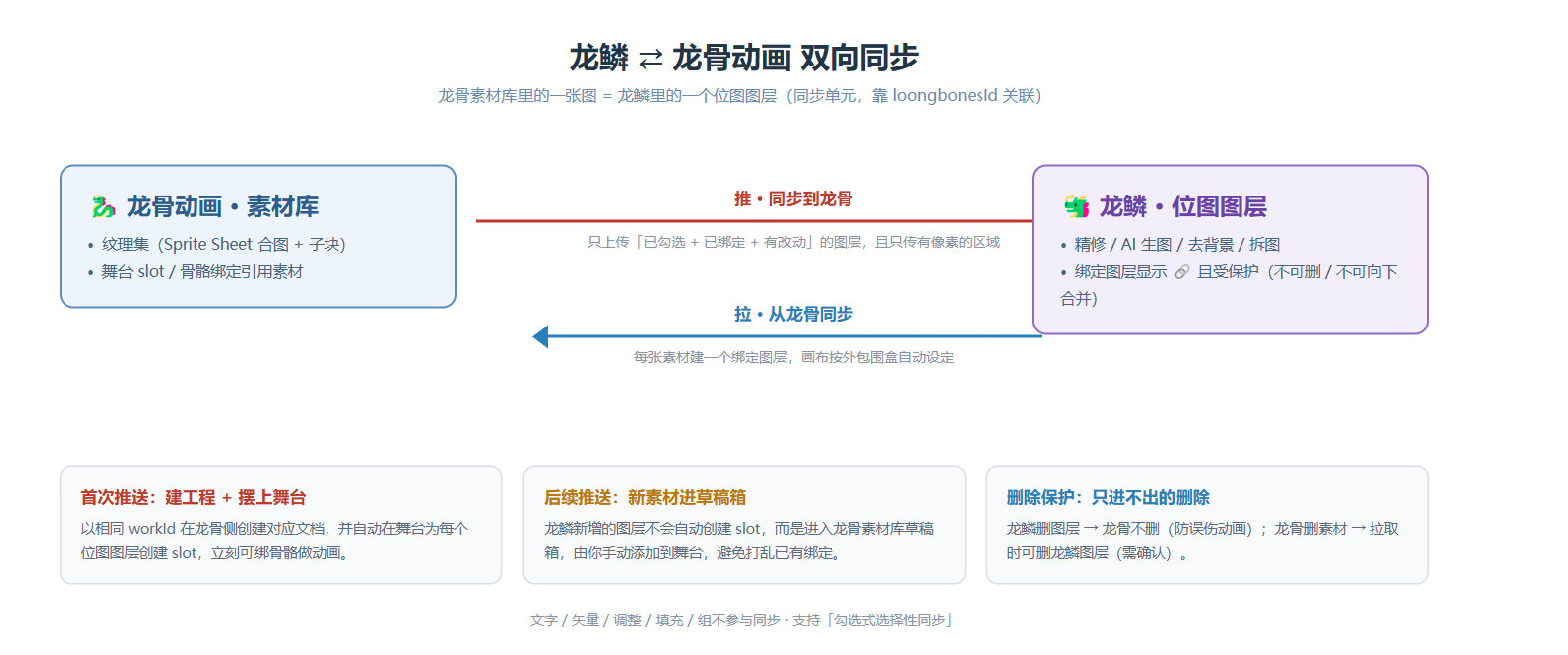
- One image in the LoongBones material library = one raster layer in LoongScales (the sync unit).
- The binding is maintained through an association key
loongbonesId: once a layer is bound, the Layers panel shows a blue link icon and it is protected (cannot be deleted or merged down). - Only raster layers are synced; text/vector/adjustment/fill/group are not.
Pull materials from LoongBones (LoongBones → LoongScales)
In the host (LoongBones) click "Edit material with LoongScales"; LoongScales will:
- Pull the bitmaps from the LoongBones library (including sprite-sheet images) in, each as a bound raster layer;
- You can then retouch each one and run AI transformations in LoongScales.
If a material in LoongBones no longer exists on the LoongScales side, the pull sync will ask whether to delete the corresponding LoongScales layer (kept by default; deleted only on confirm).
Sync to LoongBones (LoongScales → LoongBones)
After editing, click "Sync to LoongBones" (push) in the top bar / host; LoongScales will:
- Collect bound raster layers whose content changed;
- Upload only the "pixel-containing region" cropped (saves size), and write the result back to the LoongBones library (idempotent update by association key);
- Will not delete existing LoongBones materials — if you delete a layer in LoongScales, it won't reverse-delete the LoongBones resource (avoids breaking animation bone references).
- On the first sync, it automatically creates the corresponding slots on the LoongBones Stage and places each raster layer on the stage, ready for bone binding and animation right away.
- On later syncs it only updates already-bound materials and does not create new slots.
First push vs later pushes (document, stage & draft box)
The behavior differs between syncing a LoongScales work to LoongBones the first time vs subsequently; understanding it avoids confusion:
- First sync from LoongScales to LoongBones:
- Creates a corresponding LoongBones document on the LoongBones side with the same
workIdas LoongScales (one-to-one); - Also auto-creates the corresponding slot on the LoongBones Stage, placing each raster layer on the stage, ready for bone binding and animation.
- Creates a corresponding LoongBones document on the LoongBones side with the same
- Subsequent syncs to LoongBones:
- The document and existing slots already exist; LoongScales mainly does content updates;
- If you added layers on the LoongScales side (no corresponding material in LoongBones before), these new images won't auto-create slots — they go into the LoongBones library's Draft Box;
- You need to manually add the new material from the Draft Box to the material library before it can be used in animation.
In one phrase: the first sync "creates the project + places it on stage"; in later syncs, pure "new materials" only go to the draft box — whether to put them on stage is up to you, avoiding auto-placement that disrupts existing animation bindings.
Sprite sheets & one-click split
A LoongBones Sprite Sheet is one big combined image + a sub-block description. LoongScales' strategy:
- The combined image is imported as one raster layer and marked "this is a sprite sheet" (purple grid icon 🔲).
- Click 「One-click Split」 on the layer to cut the combined image into multiple independent raster sub-layers by sub-block rectangles (each bound back to its LoongBones sub-block); the original combined layer is hidden but kept.
- After you retouch a sub-layer, sync writes the change back into the corresponding region of the combined image and uploads the whole thing.
Protected layers & deletion policy (must understand)
| Direction | Behavior |
|---|---|
| LoongScales deletes layer → LoongBones | Does not delete the LoongBones material (conservative, avoids hurting animation) |
| LoongBones deletes material → LoongScales | Pull sync may delete the corresponding LoongScales layer (needs your confirm) |
| Manual delete/merge of a bound layer | Forbidden (blue link icon, button greyed out) |